
Ordering
Ordering through ACBuy: links, payment and QC
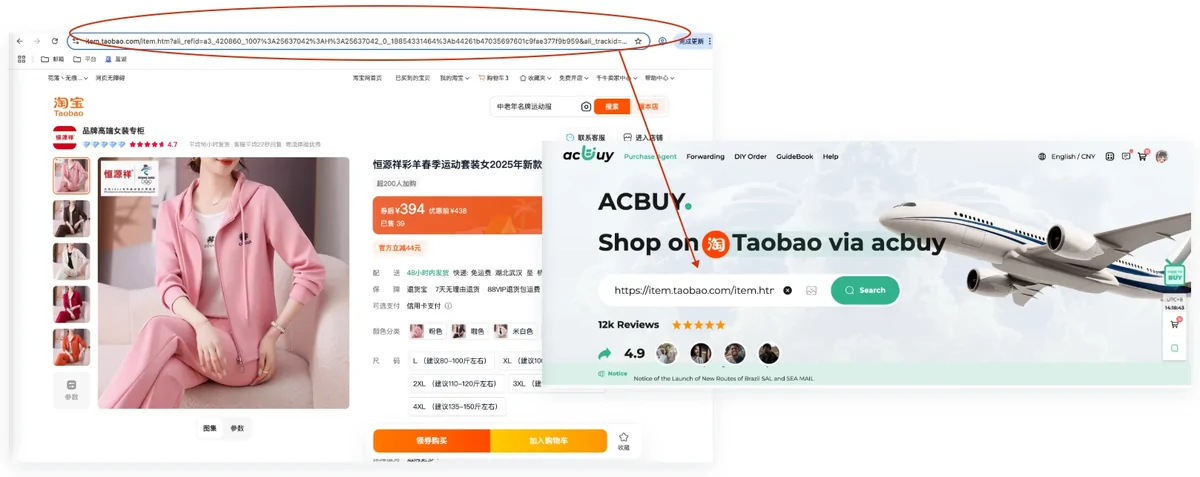
The normal route is short. You copy the product URL from the seller page, you paste it into the search box on ACBuy, and the system builds a listing page with the photographs, the price and the option list already in place. What is left for you is the part no system can infer: which option, and anything the option list cannot express.
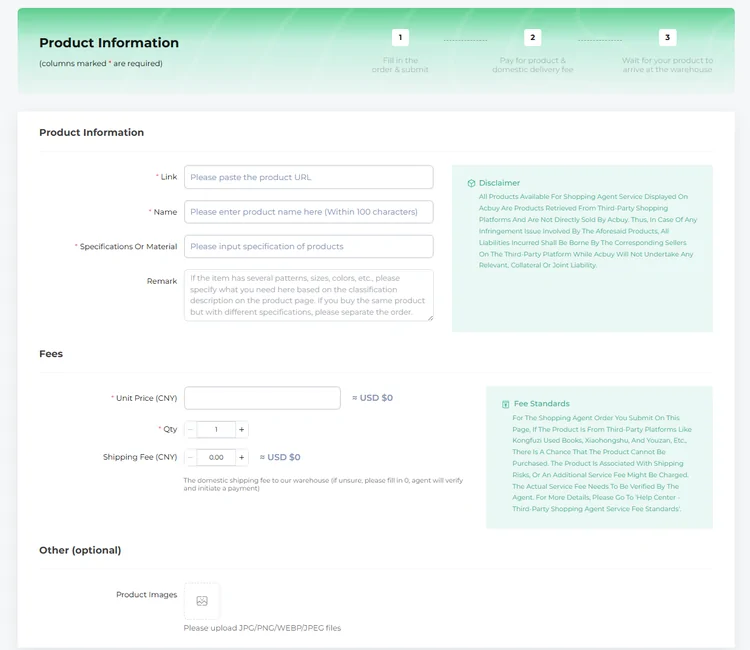
When that does not happen, ACBuy has a second, entirely different route called DIY Order, and it asks you for six things instead of two. The rest of this page is about telling the two cases apart before you waste an afternoon.
Route a find
Two questions. The answer comes from ACBuy own pages, and every result links back to the page it came from.
The remark field does the work the option list cannot
Marketplace listings sell one product with many variants, and the option names are written for a domestic shopper who can read them. When the option you need is not in the list, or the list is ambiguous, the remark is where the order gets specific.
ACBuy own instruction on that field is unusually concrete: describe what you need based on the classification description on the product page, and if you want the same product in different specifications, place separate orders. The second half is the part people skip, and it is the reason a parcel sometimes arrives in one colour.
How to order a find, step by step, as a table
Use this table for a printable summary of the same entry options. Check the seller link and chosen variant before submitting an order.
| Marketplace | Fee tier | Link works | Will not parse | Listing gone | Only a picture |
|---|---|---|---|---|---|
| Taobao | No agent service fee | Paste the URL into the ACBuy search box and order from the listing it builds | DIY Order, where you fill in what the system could not read | Nothing to submit yet, because ACBuy buys from a listing that is still live | Image search first, then run this again with the listing you picked |
| Tmall | No agent service fee | Paste the URL into the ACBuy search box and order from the listing it builds | DIY Order, where you fill in what the system could not read | Nothing to submit yet, because ACBuy buys from a listing that is still live | Image search first, then run this again with the listing you picked |
| 1688 | No agent service fee | Paste the URL into the ACBuy search box and order from the listing it builds | DIY Order, where you fill in what the system could not read | Nothing to submit yet, because ACBuy buys from a listing that is still live | Image search first, then run this again with the listing you picked |
| JD (Jingdong) | No agent service fee | Paste the URL into the ACBuy search box and order from the listing it builds | DIY Order, where you fill in what the system could not read | Nothing to submit yet, because ACBuy buys from a listing that is still live | Image search first, then run this again with the listing you picked |
| Pinduoduo | Official pages disagree | Paste it, but settle the fee tier with support first | DIY Order, where you fill in what the system could not read | Nothing to submit yet, because ACBuy buys from a listing that is still live | Image search first, then run this again with the listing you picked |
| Vipshop | Official pages disagree | Paste it, but settle the fee tier with support first | DIY Order, where you fill in what the system could not read | Nothing to submit yet, because ACBuy buys from a listing that is still live | Image search first, then run this again with the listing you picked |
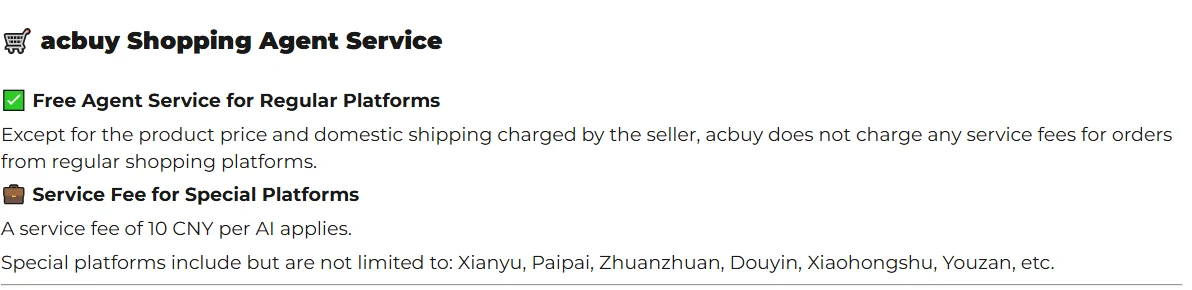
| Xianyu, second hand | Service fee per item | Paste it, and budget the special platform service fee | DIY Order, where you fill in what the system could not read | Nothing to submit yet, because ACBuy buys from a listing that is still live | Image search first, then run this again with the listing you picked |
| Paipai | Service fee per item | Paste it, and budget the special platform service fee | DIY Order, where you fill in what the system could not read | Nothing to submit yet, because ACBuy buys from a listing that is still live | Image search first, then run this again with the listing you picked |
| Zhuanzhuan | Service fee per item | Paste it, and budget the special platform service fee | DIY Order, where you fill in what the system could not read | Nothing to submit yet, because ACBuy buys from a listing that is still live | Image search first, then run this again with the listing you picked |
| Douyin | Service fee per item | Paste it, and budget the special platform service fee | DIY Order, where you fill in what the system could not read | Nothing to submit yet, because ACBuy buys from a listing that is still live | Image search first, then run this again with the listing you picked |
| Xiaohongshu | May not be purchasable | Expect the DIY Order route, and ask support before you pay | DIY Order, and ACBuy warns this platform may not be purchasable at all | Nothing to submit yet, because ACBuy buys from a listing that is still live | Image search first, then run this again with the listing you picked |
| Youzan | May not be purchasable | Expect the DIY Order route, and ask support before you pay | DIY Order, and ACBuy warns this platform may not be purchasable at all | Nothing to submit yet, because ACBuy buys from a listing that is still live | Image search first, then run this again with the listing you picked |
| Kongfuzi Used Books | May not be purchasable | Expect the DIY Order route, and ask support before you pay | DIY Order, and ACBuy warns this platform may not be purchasable at all | Nothing to submit yet, because ACBuy buys from a listing that is still live | Image search first, then run this again with the listing you picked |
| Weidian | Not named by ACBuy | Try pasting it, and expect to fall back to DIY Order | DIY Order, where you fill in what the system could not read | Nothing to submit yet, because ACBuy buys from a listing that is still live | Image search first, then run this again with the listing you picked |
| Somewhere else | Not named by ACBuy | Try pasting it, and expect to fall back to DIY Order | DIY Order, where you fill in what the system could not read | Nothing to submit yet, because ACBuy buys from a listing that is still live | Image search first, then run this again with the listing you picked |
Tiers are quoted from the ACBuy service fee page and the DIY Order form, read 2026-08-06. Pinduoduo and Vipshop are marked as disputed because the About page lists them among the platforms you can buy from while the fee page names a different set. ACBuy also states its special platform list is not exhaustive.
Three mistakes that stop an order, and what to do instead
None of these is clever. All three come from the wording of the forms themselves.
Copy the product page, not the search page
The search box expects a product URL. A results page or a shortened share link is the most common reason a paste produces nothing, and it looks identical to an unsupported platform.
Enter 0 rather than a guess
On the DIY form, the domestic shipping field carries an official instruction to enter 0 if you are unsure, because an agent verifies it and raises a payment. A guessed number is harder to correct than a blank.
Ask about the fee tier in writing
On the DIY route the real service fee is verified by an agent after you submit. If the platform sits in the disputed group, a written answer from support before you commit is the only way to know what you are agreeing to.
What happens after the order exists
Paying for the goods is not paying for shipping. The order form states that international shipping fees are calculated separately, and they are: the parcel does not exist yet, and nobody can weigh a thing that has not arrived.
From there the item sits in the warehouse until you submit a parcel. That is the point where restrictions bite and where the declared value gets decided, both of which have their own pages here.
Warehouse QC: check, ask, then decide
Open the warehouse record for each item and match it to the order number, model, colour, size and quantity. Look at the front, back, labels and visible construction. Compare a requested flat measurement with the same measurement on the seller’s chart; do not compare a garment width with a body circumference.
If a key detail is missing, request a close-up or measurement that answers one question, such as “show the size label” or “measure the insole heel to toe.” A photo review cannot prove authenticity, material composition or long-term durability.
When the item is wrong
Keep the listing and order screenshots, mark the mismatch and contact ACBuy before sending the parcel. Ask whether the seller accepts a return or exchange, the deadline, and who pays domestic postage or service fees. Wait for a confirmed decision rather than assuming that a warehouse item can always be returned.
How to use this site’s order router
Select the marketplace and what happened to its product link. The result tells you what information to prepare and links to the recorded ACBuy guidance. A “not named” or disputed result means you should ask support; it is not an automatic rejection or approval.
The router does not place orders or calculate today’s service fee. Keep the live order confirmation as the final price check.