
The catalogue
What an ACBuy Spreadsheet shows you
The name is a leftover. Years ago people really did swap links in shared files, and the word stuck to the thing that replaced them. What it means now is a browsable catalogue of products: you pick a category, you scroll through cards, and each card carries a picture, a name, the marketplace badge and the seller reference.
That is the whole object. It holds no stock, takes no money and makes no promise about the seller. Its value is that somebody has already done the finding, which is the slowest part of shopping in a language you do not read.
What an entry can and cannot tell you
Worth reading before you treat a card as a product page, because the two look similar and behave differently.
It tells you this item exists
Somebody saw it, liked it enough to add it, and recorded where it came from. That is a real service and it saves real hours.
It tells you where to go next
The link is the only functional part of the card. Everything else is description.
It cannot tell you the listing is still live
Cards do not expire when listings do. A card can outlive the shop it points at by months.
It cannot tell you the price you will pay
The seller sets the price, and it moves. The card shows what was true when somebody added it.
Why use the spreadsheet at all
Why use the spreadsheet rather than searching yourself? You could do either. Plenty of people search directly, and there are guides for it. The reason a catalogue still earns its place is narrower than it first looks.
Marketplace listings are written in Chinese for domestic buyers, by sellers who have no reason to use the words you would use. A catalogue is a record of searches that already worked. You are borrowing somebody else result, not their taste.
The catalogue also carries the one fact that decides your fee tier and your fill in work: which marketplace the item sits on. That is stamped on the card, and it is the first thing the router on this site asks you for.
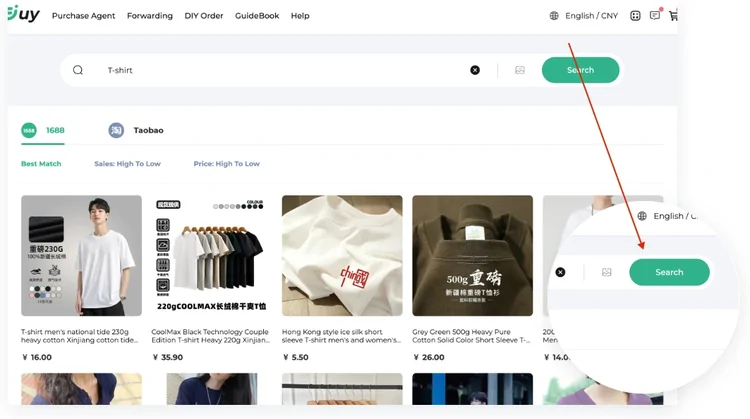
From an entry to an ACBuy order
Four steps, and only the first one happens on the catalogue.
Open the card and follow the link
You land on the seller listing on Taobao, Tmall, 1688 or wherever the card says. Check it is still live and still the same thing before you go any further.
Copy the product URL
Not the search results page and not the catalogue card. The product page itself, which is what the ACBuy search box expects.
Paste it into ACBuy
If the system reads it, you get a listing page with the photos, the price and the option list already filled in, and you choose from there.
Fill in what it could not read
If nothing comes back, the DIY Order form is the fallback, and it asks you for the link, a name, the specification, the price and the quantity.
A catalogue entry is not a receipt
The one habit worth building: treat the card as a lead and the listing as the source of truth. Prices, options and availability all live on the listing. If the two disagree, the listing wins, because the listing is what ACBuy will actually buy from.
When the listing has gone entirely, the card is still a useful description of what you wanted. ACBuy names asking it to look for a merchant as one of three official ways to find goods, and a dead card is a reasonable thing to hand over.
How to choose a useful Spreadsheet
Try several product links, look for a visible maintenance date, and check whether the guide shows the original seller rather than hiding it. A useful page explains sizes, fees and limitations; a large product count or a familiar photograph does not establish quality.
Use this same test here: report dead category links, check the live seller listing, and read the dated update log before relying on a policy summary.